Verdict up front: Tuxtop (tuxtop.com), branded inside as TuxAI, says it uses “advanced artificial intelligence technology to revolutionize traditional financial transactions” and invites you to “start your journey to intelligent investing”. It offers an app, a white paper and a page of “certificates”, but names no company. The Ontario Securities Commission warned about “Tuxtop (aka Tuxai)” on 24 April 2026.
| Website | tuxtop.com |
|---|---|
| Brand inside | TUXAI |
| Pitch | AI-driven trading; “intelligent investing” |
| Pages | Our Certificates, Download App, White Paper, Join Us |
| Regulator | OSC (Ontario) warning, 24 April 2026 |
| Domain registered | 2 March 2014 (Regery) — an old domain |
Two names, one site
The browser title calls it “Tuxtop | Online Platform Services, Tools & Digital Solutions”. Every line of the page calls it TUXAI. The OSC lists both names. Splitting a brand across a domain and a product makes complaints harder to find.
INVESTORS, TAKE NOTE 👉
Marble Zinsara Scam — 190 Markets and Nothing to Buy
Asked to deposit with Tuxtop?
✎ FILE A COMPLAINT ABOUT TUXTOP
Or write to support@ettran.com — Tell us the website, how much you sent and how — screenshots help. We will never ask for passwords or seed phrases.
AI, with no detail
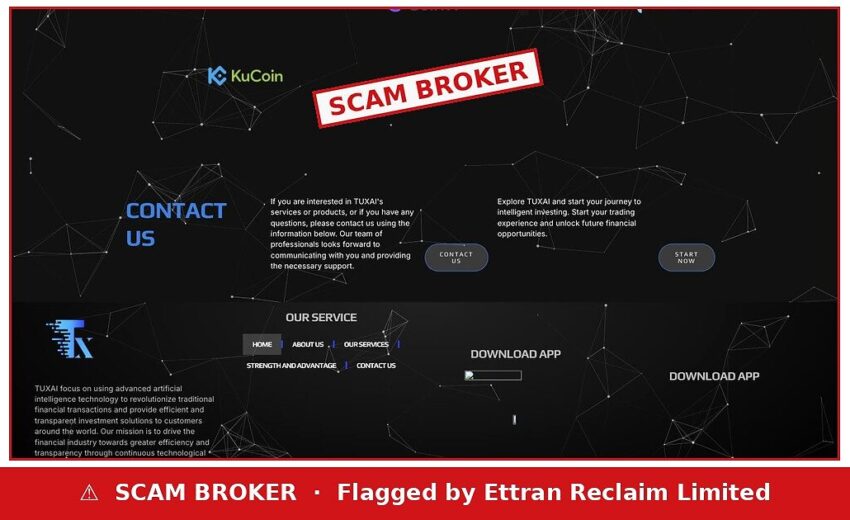
“TUXAI focus on using advanced artificial intelligence technology to revolutionize traditional financial transactions and provide efficient and transparent investment solutions.” There is no description of the strategy, no fees and no risk statement.
INVESTORS, TAKE NOTE 👉
VEO Markets Risk Review: Why Traders Should Exercise Caution
Certificates instead of a licence
A menu item reads “Our Certificates”. A company registration certificate is not permission to handle investors’ money. In Ontario that needs registration with the OSC, which has warned about this firm instead.
An app to download
“Download App” appears twice. Investment apps distributed outside the official stores, or under a different name, are a common way to show fake balances. The footer reads “Copyright © 2024 TUXAI”.
⚠ Verified evidence
- The OSC warned about “Tuxtop (aka Tuxai)” on 24 April 2026.
- Promises “intelligent investing” with AI and no strategy, fees or risks.
- “Our Certificates” in place of a licence.
- No company, address or registration on the site.
Your own check on Tuxtop
Open the CSA national registration search at aretheyregistered.ca and type the exact name “Tuxtop”, then search again for tuxtop.com. Search the name with the words “warning” and “reviews” too — victims often post first. The OSC’s investor warnings list sits alongside it. A WHOIS or RDAP lookup on tuxtop.com shows the registration date: 2 March 2014 (Regery) an old domain.
Already paid Tuxtop?
Send nothing more to Tuxtop — not even to “upgrade” or “unlock” the account. Phone your bank or card issuer and ask about a chargeback or a recall of the transfer. Capture the Tuxtop balance page and trade history today — these sites vanish.
- Save the trail: payment receipts, wallet addresses, the Tuxtop dashboard screenshots and every chat.
- Tell the Ontario Securities Commission what happened; reports add weight to the warning already issued.
The verdict: Tuxtop, or TuxAI, sells AI investing under two names with no company or registration, and Ontario’s regulator has warned about it. Do not invest.
Had money taken by Tuxtop?
✎ FILE A COMPLAINT ABOUT TUXTOP
Or write to support@ettran.com — Include what you paid Tuxtop and through which bank or wallet. We never need your login details.
Sources, checked 1 October 2026: OSC (Ontario) warning via IOSCO I-SCAN (24 April 2026) · RDAP registration record for tuxtop.com · the live page at tuxtop.com, read in full. A regulator’s warning is an alert, not a conviction. For information only — not financial advice.
Rechecked on 17 November 2026
On 17 November 2026 tuxtop.com was still online, under the page title “Tuxtop | Online Platform Services, Tools & Digital Solutions”. The domain tuxtop.com was registered on 2 March 2014.
How to check a warning from the OSC
The Ontario Securities Commission publishes investor warnings, and anyone trading or advising in Canada must be registered with a provincial regulator. Search the name on the national registration search at aretheyregistered.ca. If the firm is not there, it is not registered. Report the site to the OSC and your bank.
If you already paid
- Stop all further payments, including any “fee”, “tax” or “release charge”.
- Write down every wallet address you sent crypto to and the transaction hash for each transfer.
- If you bought the crypto through an exchange, report the transfers to that exchange’s support and fraud team.
- Report card and bank payments that funded the purchases to your bank as fraud.
- Report the site to the regulator named above and to the police.
- Be wary of anyone who contacts you offering to recover the funds for an upfront fee.